Customize the layout
End users can reorder rows and show or hide tracks directly in the viewer, live, without editing the config or writing code.
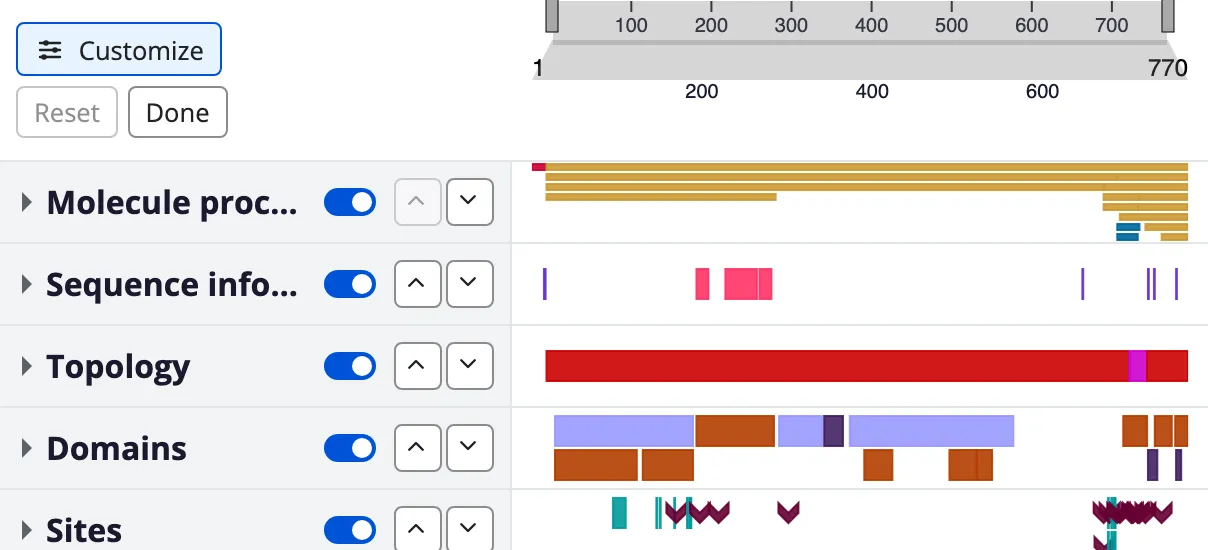
The per-row controls: show or hide, and move up or down.
The config is the source of truth. A user’s edits are written into the
viewer’s configuration — reordering a row moves it in rows:, hiding a track
sets the same hidden: field an author could have written. Nothing is layered
on top at render time, so getConfig() exports exactly what the user
arranged, ready to be saved, shared, or handed back to setConfig(). That
matters most for imported data, which has no authored config to fall back on.
Customize mode
Section titled “Customize mode”A Customize button sits in the label column beside the navigation, above the first row. Pressing it turns each row’s label cell into a control cluster. Nothing overlays or displaces the visualization — the tracks stay exactly where they are, so you watch them reflow as you arrange them.
Each row and each track offers:
- a show/hide switch (
role="switch"; its thumb position andaria-checkedcarry the state, so no colour or word is needed); - move-up / move-down buttons to reorder it.
A group header carries the same controls, plus a collapse/expand button, and moves or hides the whole group at once.
Reordering is by button, not by dragging. Buttons work the same for pointer, touch and keyboard, and they are the path WCAG 2.5.7 requires in any case. The row you moved is briefly highlighted afterwards, since a single press can carry it far enough to be hard to find again.
Movement is two-level: rows reorder among rows, and a track reorders within its own group. A track cannot leave its group, because a nested config has no way to record where it went. A hidden track is left out of its group’s collapsed summary as well, and hiding every track of a group removes the group (and its summary) from the canvas. A line-graph or coloured-sequence group’s summary draws its first visible track, so hiding or moving that track changes what the collapsed group shows.
Rows that are hidden stay in place as dimmed stubs — the label and its controls with an empty track area — so hiding is never a one-way door. Tracks whose data never arrived appear the same way, but their Show control is disabled and reads “No data”: showing them would change nothing, since there is nothing to draw.
Outside customize mode a “N hidden” button sits beside the Customize button. It counts tracks, so hiding a group of six reads “6 hidden” rather than “1”, and it leaves out tracks that are empty for want of data. Its tooltip explains how to bring them back.
Pressing it opens customize mode and opens every group holding a hidden track, so the controls that undo the hide are on screen rather than folded away behind a caret. A hidden group lists its tracks when opened, which means you can restore a single track of it: doing so brings the group back carrying only that track, leaving its siblings hidden with their own Show controls.
If everything is hidden the viewer says so and offers a reset rather than rendering an empty frame.
Reset (enabled only once something has changed) restores the authored layout; Done leaves the mode and returns focus to the Customize button. Changes apply and persist live, so there is no separate save step.
Accessibility
Section titled “Accessibility”Customize mode is built to WCAG 2.1 AA:
- Keyboard: reordering is by button, so it never depends on a dragging gesture (2.5.7). Focus stays on the moved row, moving to the opposite button when the one you pressed becomes disabled at an end.
- Screen readers: real
<button>controls with accessible names (“Show Domains”, “Move Domains up”); the show/hide control is arole="switch"reportingaria-checked; a polite live region announces each move (“Domains moved to position 2 of 12”), hide, and show (4.1.3). - Focus: a visible focus ring on every control (2.4.7).
- No colour-only state: show/hide state is carried by the switch thumb’s
position and
aria-checked, never colour alone (1.4.1); the off track also meets 3:1 non-text contrast (1.4.11) and has a forced-colors fallback. - Target size: every control is at least 24×24 px (2.5.8).
- Motion: the just-moved highlight keeps its outline but drops its fade
under
prefers-reduced-motion.
Authoring a row or track hidden (hidden)
Section titled “Authoring a row or track hidden (hidden)”A config can ship a group or track hidden by setting hidden: true:
rows: - id: MOLECULE_PROCESSING tracks: - id: signal kind: features filter: SIGNAL data: features - id: chain kind: features filter: CHAIN data: features hidden: true # a stub in customize mode, absent from the canvas - id: EXPERIMENTAL_NOTES hidden: true # whole group hidden tracks: - id: notes kind: features data: featuresThis is not an initial-mount-only default: it is the same field the show/hide
control writes. An author’s choice and a user’s are the same state, and
getConfig() exports whichever is current.
Runtime API
Section titled “Runtime API”The layout can be driven programmatically, alongside registerAdapter /
setTrackData. Every change emits a protvista-layout-change event so an
embedder can save and restore a view.
const viewer = document.querySelector('protvista-uniprot');
// Reorder the rows by id. Unknown ids are ignored; rows the list omits keep// their authored position, appended after.viewer.setRowOrder(['VARIATION', 'DOMAINS', 'MOLECULE_PROCESSING']);
// Reorder the tracks within one row (row id, then track ids).viewer.setTrackOrder('DOMAINS', ['region', 'domain']);
// Show or hide a whole lane (a group or a standalone track).// Showing a group also clears any per-track hides inside it.viewer.setRowVisibility('MOLECULE_PROCESSING', false);
// Show or hide one track within a group (group id, track id).viewer.setTrackVisibility('MOLECULE_PROCESSING', 'chain', false);
// Restore the authored config (drops every reorder + show/hide).viewer.resetLayout();
// Export the arranged view as an authored config — save it, share it, or// hand it straight back to setConfig().const config = viewer.getConfig();await viewer.setConfig(config);
// Read the compact diff from the authored config (safe to keep / serialize).const patch = viewer.getLayout();// → { order: string[] | null, tracks: Record<string, string[]>,//     hidden: { rows: Record<string, boolean>,//               tracks: Record<string, Record<string, boolean>> } }
viewer.addEventListener('protvista-layout-change', (e) => {  // e.detail is the same LayoutPatch shape as getLayout()  console.log(e.detail.order, e.detail.tracks, e.detail.hidden);});
getConfig() and getLayout() answer two different questions. getConfig()
returns the whole arranged configuration, in the shape it was authored — that
is the artifact to save or share. getLayout() returns only the diff from
the authored config: which rows moved (order), which tracks moved within
their row (tracks), and what was shown or hidden (hidden, split into
hidden.rows keyed by row id and hidden.tracks keyed by row id then track
id). The diff exists because it is small enough to put in a URL.
Persistence and sharing
Section titled “Persistence and sharing”A customized layout persists automatically, as that compact patch:
- localStorage, keyed per config (a hash of the config’s row + track ids), so a user’s layout survives a reload in the same browser and applies to every protein viewed with the same config.
- A shareable
?layout=URL parameter, updated as the user customizes, so the exact view can be sent by link.
On mount the restore precedence is ?layout= URL > localStorage >
authored default, and the patch is replayed onto the authored config before
the first render. “Reset to default” clears both stores.
A saved patch tolerates the config changing underneath it: unknown ids are ignored, and rows or tracks it does not mention keep their authored position and visibility. Editing a config does not throw away users’ arrangements.
Set the no-persist-layout attribute to opt out entirely. A viewer with
this attribute neither restores a saved/shared layout nor writes one, which
is the right choice for an embedder that manages layout itself:
<protvista-uniprot accession="P05067" no-persist-layout></protvista-uniprot>Next steps
Section titled “Next steps”- Author a config — the rest of the config structure
hidden:sits in. - Escape hatches — the other runtime registration methods (
registerAdapter,setTrackData) the layout API sits beside. - Configuration vs data — why an arranged view exports as a config rather than a parallel overlay.
Licensed under CC BY 4.0.
This work was supported by the Research Software Maintenance Fund, managed by the Software Sustainability Institute and funded by UKRI grant reference AH/Z000114/1.